Symptom:
Third-party apps, games, ROMs, Z-code, books, or themes are not showing up after installation.
Fix:
1.) Uninstall / Reinstall the app.
Check if the app runs.
Run BossPrefs, tap 'More', tap 'Fix User Dir Permissions'.
Check if the app runs.
Goto 'Settings', select 'Wi-Fi', and press the little arrow to the right of your wireless network name.
Note the your IP address.

If using Cyberduck, Click 'Open Connection', enter your IP address into the server field.
Enter root into the Username field.
Enter alpine into the password field (unless you changed it).
click 'Connect' -[allow up to 30 secs for secure key generation if SSH wasn't used before.]
At any rate, you should see something like this:
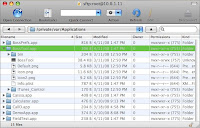
Check the 'Permissions' column, of the app (folder) in question. It should end with (755) or (775).
Click the little triangle to open the directory, the files inside should have similar permissions, except for the '.plist' file, which may end with (644).
To change the permissions,carefully highlight (click) the file.
Check to make sure you have highlighted the correct file.
hold down the 'Apple' key (either side of 'space') and then press 'I'
Check to make sure the window displays the correct file.
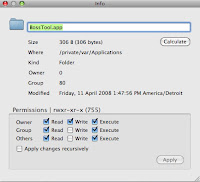
Check the appropriate boxes to equal (755) as shown.
Check to make sure the window displays (755) as shown.
Do *not* check the 'Apply changes recursively'. (as shown)
Check to make sure the 'Apply changes recursively' is *not* checked. (As shown.)
If the .plist file shows (000) change it to (644)....
Carefully repeat for each file in question.
Reboot the iPhone.
Don't forget to turn OFF SSH (install 'BossPrefs' if necessary)
[ installer repository: sleepers.net/iphonerepo ]


It's remarkable in support of me to have a website, which is good in support of my knowledge. thanks admin
ReplyDeleteFeel free to visit my homepage ipad walkthrough videos
Hi I am so thrilled I found your site, I really found you by mistake, while I was
ReplyDeletebrowsing on Bing for something else, Nonetheless I am here now and would just like to say kudos for
a fantastic post and a all round exciting blog
(I also love the theme/design), I don’t have time
to read it all at the moment but I have book-marked it and also added in your RSS feeds, so when I have
time I will be back to read more, Please do keep up the fantastic work.
Here is my page; iphone client - http://weightlossherbalife.co.za/ats/index.php?a=stats&u=ignaciosander -
Very Nice presentation of your business and i am sure that it will give you more benefit iphone repair
ReplyDeleteThanks a lot for the ton of tangible and attainable help! I also find such kind of great things at laga iphone 7 stockholm. Thanks for the great share!
ReplyDeleteI favor your post. It happens to be exceptional to determine somebody explain in words from a center plus good quality using this type of vital subject theme could possibly be quickly seen. las vegas cell phone repair
ReplyDeleteThis blog post is really great; the standard stuff of the post is genuinely amazing.Phone parts
ReplyDeletePhone screen repair the iTouch: Fixing DIR permissions.
ReplyDeleteSymptom:
Third-party apps, games, ROMs, Z-code, books, or themes are not showing up after installation.
Fix:
1.) Uninstall / Reinstall the app.
Check if the app runs.
2.) If you haven't earlier, check your apps location....
3.) Install 'BossPrefs'.
Run BossPrefs, tap 'More', tap 'Fix User Dir Permissions'.
Check if the app runs.
4.) Insure SSH is On. (you DO have SSH installed, right?)
Goto 'Settings', select 'Wi-Fi', and press the little arrow to the right of your wireless network name.