Showing posts with label iPad. Show all posts

Monday, March 17, 2014

Monday, September 5, 2011

Avatron Air Display driver issue under Mac OSX: Lion.


As mentioned at the bottom of the Avatron site

The Air Display host software runs well on Lion, but has this limitation: the built-in video driver on certain 2008 and 2009 Macs is incompatible with third-party video drivers. You can still install the Air Display host software, but until Apple fixes the issue, the Air Display drivers will disable themselves on Lion on these specific machines.
Affected machines include:
  • 13" MacBook (aluminum late 2008, early, mid, and late 2009)
  • 13" MacBook Air (late 2008, mid 2009)
  • 13" MacBook Pro (mid 2009)
  • 15" MacBook Pro (late 2008, 2.53 GHz mid 2009, mid 2009)
  • 17" MacBook Pro (early and mid 2009).
  • 20" iMac (early or mid 2009)
  • 24" iMac (early 2009)
  • 21.5" iMac (late 2009)
  • Mac mini (early or late 2009, Server late 2009)
  • Mac mini Mac OS X Server (late 2009)
Apple is aware of the bug. We are hopeful that they will release a fix soon.


Tuesday, November 23, 2010

Use Your iPad As A Second [Wireless] Monitor:

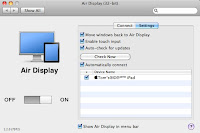
Available from the Apple App Store ‘Air Display' [$9.99US] will allow you to use your iPad through your wireless network as a second monitor with your Macintosh, or regular PC.

It works pretty well, although a tad sluggish [tried on a ‘G-band’ WiFi network].

Pricey, but a pretty good application overall.


Align like any other monitor.
The iPad resolution is 768 X 1024 [or 1024 X 768 :^].


Some Screen savers display on both monitors, albeit with some delay; especially the more animated ones [like this one via MacUpdate].


Main screen, and iPad to the right.
There’s a little optional drop-down menu with preferences for the menu bar at the top.


Apparently it works with the iPhone, and iTouch too, and adds touch-screen to the device monitor. Cool.

Secure those iPad (iPhone, iTouch) Files:

With most new/cool/electronic devices, people like to gain hands-on experience ...for good or bad.
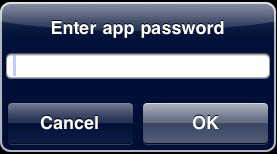
Locking the iPad (or iPhone, iTouch) with a passcode is a good first step, but what if someone wants to try the device out?

Using an app like “Goodreader” allows you to password protect your sensitive documents (Text, Photo, PDF, etc…) from prying eyes.


Monday, May 10, 2010

Saturday, May 8, 2010

at&t rumored to remain exclusive iPhone carrier till 2011

Reports are speculating Apple made a deal with at&t to extend iPhone exclusivity to the end of the year in exchange for half-priced iPad data plans.

Although I hate at&t ($220/month for 1400 family plan with 3 iPhones); The bar has been set for iPad data now.


It’s just a matter of time before I/We kiss-off at&t forever.

Tick-Tock, Tick-Tock…

Tuesday, May 4, 2010

iPad Jailbreak takes two minutes.

Including rebooting the device.

Wednesday, April 21, 2010