Device erroring out when trying to sync?
Try these steps: [Attempt re-syncing after each step.]
1.) Insure the device isn't sleeping.
Depending on what is installed, you may need to turn off sleeping when syncing.
2.) Check the USB cable, and computer port.
Try a different USB port. (USB 2 is faster, but USB 1.1 will work) (Firewire will charge, but not transfer data anymore.)
3.) Try a different computer, if possible.
4.) Turn the device off, and back on.
5.) Hard reset the device.
-Hold the 'Home' button, and the 'sleep' button until the iPhone / iTouch shuts down.
-Hold the 'Menu' button and the center button on the iPod until the device shuts down.
6.) Check your permissions. (Jailbroken [hacked] iPhone / iTouch)
If unfamiliar with Unix, feel free to skip this step.
Use CyberDuck to path private/var/mobile/Library/Safari
Highlight [click on] Bookmarks.plist, type Command-I to change the permissions to 775,
or...
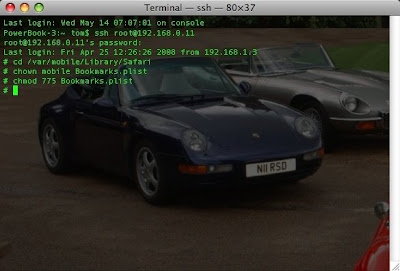
Run 'Terminal'.
SSH to the device.
Carefully [case-sensitive] enter or copy/paste these commands: (See the screenshot)
cd /var/mobile/Library/Safari
chown mobile Bookmarks.plist
chmod 775 Bookmarks.plist
Turn off SSH, if possible.
7.) Uncheck all sync options in iTunes, try syncing, then recheck them, and sync again.
8.) Reinstall iTunes.
9.) Reset your sync history.
Run 'iSync' select 'Preferences' click the "Reset Sync History" button.
10.) Reset all settings on the device.
Tap 'Settings', tap 'General', tap 'Reset', tap 'Reset All Settings'.
11.) Last Resort: Restore the device. (You will need to re-hack if you choose to.)
Run 'iTunes', click 'Restore' from the 'Summary' screen.