Thursday, August 2, 2012

Macintosh Keychain Repeatedly Prompts For Access To Confidential Information…

Symptom:
The Mac computer continually [every power-up, reboot, or when the program is ran] asks for permission for an application to access a keychain.


Possible Cause:
The password is flagged to prompt every-time an application requests it.


Please Note:
This is a safety check put in place to protect the system from potential harm from unsafe programs.

Use this solution only if you are familiar with both the application or process which is asking, and the password it is requesting; as this will grant permanent permission.


Possible Solution:
Allow the application permanent access to the password:
(This is assuming the “Always Allow” option was tried previously.)

[Note: 1Password is shown for demonstration purposes only, choose the actual password and application/process appearing in your dialog box….] 


1.) Open Keychain Access from the Utilities folder [found within the Applications folder].

2.) Select the password referenced in your pop-up dialog box:


<- example referenced password.


<- example referenced password.


3.) Double-click your referenced password (or right-click and choose “Get Info”) from the Keychain Access list.

4.) Click “Access Control” in the pop-up box, and;

5.) Click the little plus sign in the lower left corner to “always allow access” to the password.
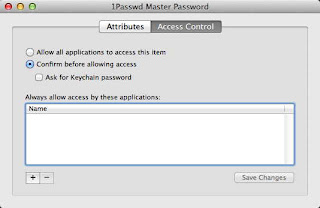


6.) Locate the application, [or process] or search for it and click “Add”.


7.) Click “Save Changes”.


Done.

Sunday, July 29, 2012

Sitemeter Login (Account Unavailable) Issues:


FYI:
Sitemeter has occasional login (server) problems.


"The Site Meter database for your account is currently unavailable. Please wait a few minutes and try again.”


[The site has been largely inaccessible again today.]


Saturday, July 28, 2012

Mac OS X Mountian Lion (10.8) System Preferences Control Panel Won’t Open

Symptom:
Upon clicking the desired control panel, System Preferences displays a drop down message “To use the preferences pane, System Preferences must quit and reopen.”

- Clicking “OK” restarts System Preferences, however the drop down message reappears again. And again….


Possible Cause:
System Preferences is attempting to open a 64-bit preference pane in 32-bit mode.


Possible Solution:
1.) Close System Preferences if running.

2.) Right-click [or Control-click] on System Preferences, move to highlight “Options”, and select “Show in Finder”. If System Preferences isn’t in the dock, locate it in the Applications folder. ]


3.) Right-click [or Control-click] on System Preferences, and select “Get Info”.

4.) Un-check “Open in 32-bit mode”.


5.) Close the System Preferences Info box, and you’re done!


Monday, July 23, 2012

Xfinity / Comcast Webmail And Secure Website Issue

Symptom: 
The [secure] web page times-out with an "error 7" or "server not responding" when attempting to access Xfinity / Comcast website email (webmail) or some secure web sites - While using an Arris "Dory" cable-modem gateway model TG862G.


Possible Cause: 
Bad Arris "Dory" Cable-modem Gateway Firmware. (Model TG862G - as indicated on the lower front panel).


Possible Solution: 
1.) Reset the gateway*
2.) Replace the device.

*At this time, no firmware update is available; resetting will not correct the problem.


RESETTING THE DEVICE MAY CHANGE YOUR SSID (NETWORK NAME) AND/OR YOUR WIRELESS NETWORK PASSWORD.


To reset, you'll need to press the recessed button inside the back panel and hold it in for 30 seconds. The factory settings will be restored.
Note the factory SSID (network name) and password are on the sticker on the bottom of the device.


Verifying the firmware can be accomplished by entering 10.0.0.1 as a URL into your browser, using admin and password to access the Dory when prompted, then clicking Connection followed by Xfinity Network from the left hand margin; and scrolling down to Cable Modem.


Note: The SMC "Dory" is NOT experiencing this issue.

Wednesday, November 9, 2011

Is your iPhone 4S draining the battery quickly?

I heard about the issue before purchasing the new iPhone, which I received 8 Nov.

My iPhone is fine; unless I have reminders set. The battery will then drop faster, too fast.
I opened Settings, clicked Location Services, and turned off Reminders; things returned to normal.

Is this the issue? Too early to tell. Just a theory.


[Apple has apparently discovered the culprit, and is preparing has a fix….]

Sunday, November 6, 2011

Another iOS Untethered Jailbreak Scam:


                  Yet another jailbreaking SCAM.

Wednesday, November 2, 2011

Lolz: New Store Grand Opening!

Read on Daring Fireball:


Maybe Microsoft Should Get into the Concert Ticket Business?

Impressive?


Anatomy Of An Online Scam:

Anatomy Of An Online Scam.

Treat every new site as a scam.


Looks legit?, Right?


Order form has “cred”, Right?


"Frequently Asked Questions", Right?


"Customer reviews", Right?


Hmmm, chat’s offline?, yeah right...


Big claims, Right?


WRONG.


fastra1n / fastunlockiphone.com is fraudulent.
You will *not* jailbreak or unlock your iPhone. You will lose $24.99.
Karma doesn’t register with these people. Screw ‘em protect yourself.


The only way to ‘contact’ anyone: eMail. (fake captcha and all).


It’s best to treat any potential purchases from a business as if you’ve been scammed; attempt to contact the company; no / unanswered / invalid phone number?


Search the business online, in the case of new products, wait for a credible source before committing.


At least order by credit, you can usually be reimbursed by the card companies in the event of a scam such as this.


Search Avoiding Online Fraud.


Been scammed by an online ‘business’?

-Copy and/or screen-shoot any and all information, and file with the Better Business Bureau (USA); and the Internet Service Provider (eMail issuer) for the support [if any], or contact listings.

See also; PC Mag: Top Five Online Scams.

Tuesday, October 11, 2011

Apple Releases iTunes In The Cloud 10.5.

Apple has released iTunes 10.5.
The first step toward iCloud integration (worry-free integration of purchases, backup and computer personalization.) has arrived.

The impending release of the full iOS 5 (141) [iPod touch, iPhone 3GS, iPhone4, and iPad 1, 2] operating system update, (scheduled for tomorrow, 12 Oct 2011, 12 noon) which promised an Operating System of  “Star Trek” worthly praise [if only in the ‘very-early Dr. Soong prototype “A5" sort of way'] [Star Trek; emphasis mine].... I am fairly certain this signals the early steps toward an Apple ‘iRobot’? ‘iAndroid’? ‘iPersonal Assistant’? [lol - in name/branding only, I’m serious (iHope)].

—remind self to review Steve’s keynote presentation notes on presentations.*


* Cudos to Tim Cook, Phil Schiller, Greg Joswiak,and Scott Forstall for the great keynote, considering the circumstances, pressure, and competition; an excellent job.

Sure sugar is sweet, but better tasting then piss-water, or sewer-water.