Showing posts with label iPhone / iTouch: Hacking. Show all posts

Monday, March 17, 2014

Thursday, January 24, 2013

iPhone Jailbreak / Unlock DO NOT BUY:

The iPhone-Dev Team and Chronic are working on the actual FREE software.

Redsn0w (iPhone-Dev Team)

Absinthe (Chronic Devolpment)


Before ever considering a purchase, check their support section, HOW could you contact them???


Do NOT fall for the many SCAMS out there.

That is all.


[ Aggregate: iPhone untethered jailbreak 6.1 6.0.2 6.0.1 5.1.1 5.0.1 unlock baseband ]

Sunday, November 6, 2011

Another iOS Untethered Jailbreak Scam:


                  Yet another jailbreaking SCAM.

Wednesday, November 2, 2011

Anatomy Of An Online Scam:

Anatomy Of An Online Scam.

Treat every new site as a scam.


Looks legit?, Right?


Order form has “cred”, Right?


"Frequently Asked Questions", Right?


"Customer reviews", Right?


Hmmm, chat’s offline?, yeah right...


Big claims, Right?


WRONG.


fastra1n / fastunlockiphone.com is fraudulent.
You will *not* jailbreak or unlock your iPhone. You will lose $24.99.
Karma doesn’t register with these people. Screw ‘em protect yourself.


The only way to ‘contact’ anyone: eMail. (fake captcha and all).


It’s best to treat any potential purchases from a business as if you’ve been scammed; attempt to contact the company; no / unanswered / invalid phone number?


Search the business online, in the case of new products, wait for a credible source before committing.


At least order by credit, you can usually be reimbursed by the card companies in the event of a scam such as this.


Search Avoiding Online Fraud.


Been scammed by an online ‘business’?

-Copy and/or screen-shoot any and all information, and file with the Better Business Bureau (USA); and the Internet Service Provider (eMail issuer) for the support [if any], or contact listings.

See also; PC Mag: Top Five Online Scams.

Sunday, September 20, 2009

Jailbreaking your iPhone / iTouch:

The following links reference the iPhone Developers Blog. These brilliant people are continually updating their software to enable better control of the iPhone / iTouch you've purchased.

The options provided include:
- Additional software not provided or sanctioned by Apple Inc.
- Access to the file system.
- Custom ringtones, wallpapers, themes.
- Maintaining your 'Think ...Different' attitude.


First, know your hardware version;  I.E. is it a 2G-(the original model), 3G, or 3GS iPhone.

Second, check your Software and Firmware versions:
[Touch  Settings >  General >  About]
Note the [operating system software] Version and Modem Firmware.


If you have operating system software (sometimes referred to as the firmware):

Version 2.2 click here.

Version 2.21 click here.

Version 3.0 click here.

Version 3.0.1 click here.

Version 3.1 unavailable at this time.


  Bonus!   iClarified has several iPhone step-by-step guides here.
                    (iClarified's iTouch step-by step guides here.)


Maintaining iPhone Jailbreak with OS 3.1; Step One.

On jailbroken devices, run Cydia now (upgrade the program if you don't see the heart):


Click the heart to have your device's hash signature saved from future reference.

Deciding not to have your device on file will probably lock the device out of future jailbreaking attempts.

Do not upgrade to 3.1 at this time; this is step one in preparation for maintaining control of your device.


Thanks to the iPhone Development team for thier outstanding help.


Once your has file has been recorded, you'll see this message:


Sunday, September 6, 2009

Wednesday, February 25, 2009

5-Layer Keyboard for [Hacked] iPhone / iTouch!


The original keyboard is still available, toggled by the globe icon (left of the Space bar):


The new layout; touch the '123' button to toggle the top row:


The new layout; touch the 'up arrow' (above the '123' button) to toggle special characters:


Another fine BigBoss release which enables five layer keyboards!
"5-Row QWERTY Keyboard" is installed through Cydia.


• Yes, it will conflict with overlays such as 'Antique Brass Keyboard'.

Tuesday, January 27, 2009

[hacked] iPhone/iTouch memory allocation chart


{Unhacked devices can use the built-in setting.}


Many people don't realize Cydia has a built-in memory allocation pie chart.

(Cydia and Installer are the two programs installed on the devices when hacked by ZiPhone.)

Run Cydia, touch 'Manage', touch 'Storage'.


Also see the previous posts regarding BossTool and SBsettings.

Wednesday, January 14, 2009

Another good 3rd party app for iPhone/iTouch utilities:

SBSettings a BigBoss app* which allows quick access to:

-WiFi and Data IP addresses.
-Used/free space for the device's memory (sometimes referred to, incorrectly, as HDD space).
-Quick Respring and Power off.
-Quick toggling for various options such as WiFi, SSH, and BlueTooth -among others.
-Quick access to any programs (up to 12) you can add to the the pop-up 'Dock' (within the app).

Wiping your finger across the top of the screen accesses the drop down menu:


Touching the 'Dock' button reveals the application icons previously selected through the 'More' option:


Good Stuff.


*BigBoss, a brilliant programmer(s) whose apps are installed through Cydia or Installer (iPhone School links) via ZiPhone, which installs them both quickly, and easily.

Tuesday, January 13, 2009

iPhone Stack.app / Entended Preferences.app options not showing in Settings

Symptom 1: Installing the 3rd party app 'Stack' places the floating icon in the center of the dock, and there is no way to adjust this.

Symptom 2: Installing the 3rd party app 'Extended Preferences' doesn't appear to work.

[Uninstalling / reinstalling has no effect.]


The applications install their preferences into the native 'Settings' program.
However, the settings for Stack or Extended Preferences are not shown.


Culprit: 'Stack' and 'Extended Preferences' conflict with each other.

Fix: [From reader Dominick, Thanks!], turn off Extended Preferences in winterboard (if installed).

Fix: Uninstalling Extended Preferences or Stack until a patch is issued.
-Reinstalling Extended Preferences with Stack installed will prevent the extend prefs from appearing.
-Reinstalling Stack with Extended Preferences installed will prevent the exstended options (settings) appearing.
-At this point, it's one or the other.


Some screen shots showing Stack after uninstalling Extended Preferences


Note: you must place an icon behind the stack to space your five icon dock correctly.
A blank icon (using iBlank works best.)



Tuesday, April 29, 2008

iPhone / iTouch app & repo (source) locator:


iSpazio.net has released a new application RepoName which lists repositories for most known apps!

You can even eMail a request to locate an missing app.


Repository - http://repo.codegenocide.com/

[See post on entering repo's here.]


Swee.


Friday, April 25, 2008

Changing the default iPhone / iTouch password.


[Firmware earlier than version 1.1.3 and using BSD Subsystem earlier than 2.0 can skip to the third step**.]


The supplied UNIX passwd command in BSD Subsystem is broken for firmware 1.1.3 and 1.1.4.
Attempting to change the password under firmware 1.1.3 or 1.1.4 will result in your device continuously rebooting.
(The reboot fix involves holding both the Power button and the 'Home' button down for at least 30 seconds, then [upon seeing a triangle icon], plugging the device into iTunes for restoration.)

What to do, what to do.
Ah-Ha!  Replace the broken passwd command with the older, but working version...


iPhone / iTouch using firmware version 1.1.3 or 1.1.4, using BSD Subsystem 2.0, follow these steps:


First, download the older, but working unix passwd command.


Second, using, as always, CyberDuck; SSH** to your  /usr/bin  directory, and replace [drag and drop] the old cmd with the new one.

Now, click on the 'passwd' file in the CyberDuck window listing (to highlight it), then right-click and select 'Info'  -verify the file permissions as (755).  [all except group-write and others-write checked.]


Third, run Terminal, and type  ssh root@youripaddress
When prompted, enter the default password  alpine    (Firmware prior to 1.1.3, has the password  dottie  )
Type  passwd  and press 'return'
Type your new password as directed.
Type  exit  and quit Terminal.


Fourth, push the 'Disconnect' button on CyberDuck, and reconnect again, using your new password.


Don't forget to turn the device's SSH OFF when done.


** Basic SSH instruction within the previous post here.

Thursday, April 24, 2008

iPhone / iTouch Manual Backup : (


[This refers to hacked devices.]
Apple describes the iTunes automatic backup here.

While there is no application to backup the device odomatically, you can backup manually.


Its recommended to use an app like Insomnia, (or tap 'Settings', tap 'Display', and set Screen Lock to 'Never') to prevent the device from sleeping temporarily.

You will need to SSH to the device, and copy the folders...


The files your concerned with are all within the  /private/var   directory path.

Create directory folders on your HD using the same hierarchy structure as the device, making it easy to remember where to place them again if ever necessary.  (ex: copy your apps to a folder named 'Applications' within a folder named 'var' within a folder named 'private', within a folder named 'iPhone BackUp' on your desktop.)


Backup:

/private/var  (Any miscellaneous files not in folders except 'MobileSafari', and icon.png'.)

/private/var/Applications  (3rd party apps)

/private/var/mobile/Library  (Preferences, settings)

/private/var/mobile/Media  (more settings, eBooks, Game Files [iPhysics, ROMs],  Music, pictures [DCIM], and recordings.)

/private/var/msgs  (messages)

/private/var/Ringtones  (any non-standard ringtones)

/private/var/root  (any miscellaneous files not in folders)

/private/var/root/Library  (settings)

/private/var/root/Media  (pictures, eBooks [not-relocated to mobile], games [frotz], and PDF files [if installed].)

As always, TURN OFF SSH after you're though.
Also, Set Screen Lock on again, if you turned it off for this process.

Keep those backups in a cool, dry place.


Wednesday, April 23, 2008

Grouping or Hiding 3rd party iPhone / iTouch apps:


Required Apps (both from BigBoss through the source):

Run Installer, install Categories, and Poof.
Run Categories, create new folder(s) as described therein.

Upon updating any categorized apps though Installer, run Poof and immediately exit the program, which will refresh the updated apps location, no further action needed.


Furthermore, using BossPrefs, you can assign apps to its own dock, by tapping 'More', and tapping 'Dock Icons':  Tap 'Add', and then tap the apps to dock in BossPrefs. 

Then run Poof, tap those same apps to hide, and they will only be displayed at the bottom of the BossPrefs scrollable dock.


Friday, April 11, 2008

iPhone / iTouch: Fixing DIR permissions.

Symptom:
Third-party apps, games, ROMs, Z-code, books, or themes are not showing up after installation.

Fix:
1.) Uninstall / Reinstall the app.

Check if the app runs.


2.) If you haven't earlier, check your apps location....


3.) Install 'BossPrefs'.
     Run BossPrefs, tap 'More', tap 'Fix User Dir Permissions'.

Check if the app runs.


4.) Insure SSH is On. (you DO have SSH installed, right?)

Goto 'Settings', select 'Wi-Fi', and press the little arrow to the right of your wireless network name.

Note the your IP address.


If using Cyberduck, Click 'Open Connection', enter your IP address into the server field.

Enter root into the Username field.

Enter alpine into the password field (unless you changed it).

click 'Connect' -[allow up to 30 secs for secure key generation if SSH wasn't used before.]


Navigate to [Case-sensitive] or copy/paste:   private/var/mobile/Applications/  in the 'quick connect' field, or, select /private/var from the pull-down menu, and click double-click 'Applications' from the resulting list.

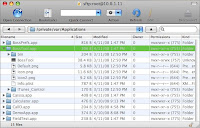
At any rate, you should see something like this:

Check the 'Permissions' column, of the app (folder) in question. It should end with (755)  or (775).

Click the little triangle to open the directory, the files inside should have similar permissions, except for the '.plist' file, which may end with (644).


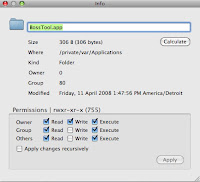
To change the permissions,carefully highlight (click) the file.
Check to make sure you have highlighted the correct file.

hold down the 'Apple' key (either side of 'space') and then press 'I'
Check to make sure the window displays the correct file.

Check the appropriate boxes to equal (755) as shown.
Check to make sure the window displays (755) as shown.

Do *not* check the 'Apply changes recursively'. (as shown)
Check to make sure the 'Apply changes recursively' is *not* checked. (As shown.)

If the .plist file shows (000) change it to (644)....

Carefully repeat for each file in question.

Reboot the iPhone.

Don't forget to turn OFF SSH (install 'BossPrefs' if necessary)
[ installer repository: sleepers.net/iphonerepo ]

Tuesday, April 8, 2008

Favored third party iPhone / iTouch Installer sources


Run Installer, tap 'Sources', tap 'Edit', tap 'Add', enter an address, tap 'OK' to refresh. (This will take increasingly longer, for each source added.)

Type each source as listed, they are Case Sensitive.

Another option, would be to add Shai's source, and then proceed to delete [tap 'Edit', tap the red circle alongside an unwanted source, and tap 'delete'] the undesirables.
i.e. foreign languages, HP calculator templates, the porn [Code Genocide] source....


Note: If a source repeatedly (...days) appears under the 'Untitled' header toward the bottom of the scrollable source list, consider deleting it, as the server is offline.


Apogee LTD
http://apogeeltd.com

BigBoss' Apps and Things
http://thebigboss.org/repo.xml

BigBuckz's Repo
http://dboxy.com/repo.xml

--> Blaze Ultimate  (Sources) <--
blazecompany.googlepages.com/blaze.xml

BiOsS's Modz
http://repo.aakqtr.com

Blake's iTouch Apps
http://iphone.latte.ca/

CedSoft
http://prog.cedsoft.free.fr/

http://repo.codegenocise.com/

Digital Agua Repository
http://repo.digitalagua.com

Fight Club
http://dezign999.com/repo

Holegs Apps  (Multimedia)
http://www.holeg.de/res

i.Marine Software
http://caissa.us

iLeks Repository
http://iphone.ileks.com

imimux Repository
http://imimux.com

iPod.iGuy.dk
http://ipod.iguy.dk

--> iSpazio Laboratory (RepoName.app) <--
http://labs.ispazio.net
http://repo.ispazio.net

iTouchable.de  (Themes)
http://repo.itouchable.de/

Makayama Software
http://tinyurl.com/2t8cax

Mateo BBLK  (Audio)
http://bblk.net/iphone

Mine Shaft Gap Repository
http://i.mineshaftgap.net/

MTL Repository
http://home.mike.tl/iphone

Project Gutenberg  (eBooks; requires the utility 'GutenMark')
http://library.pollack.ca/gutenberg_scifi

Repo.sc
http://repo.sc/iptfrepo

Robota Softwarehouse
http://iphone.robota.nl

Saurik's Coding Toolbox
http://apptapp.saurik.com/

--> Shai's Apps  (Sources) <--
http://ride4.org/shai.xml

Skrew
http://i.danstaface.net

Soneso Repository
http://soneso.com/iphone

SOS iPhone
http://rep.sosiphone.com

Trejan.com Repository
http://trejan.com/irepo

Xwaves
http://irepo.xwaves.net

ZodTTD.com Releases
http://zodttd.com/repo/


Language Sources:

Arabic
apps.iphoneislam.com
 
Chinese
iphone.freecoder.org/rep/
iphone.org.hk/repository.plist  (Simplified)

Danish
iphone.vildmedmac.dk/install

French
rep.frenchiphone.com

Greek
greek-iphone.com/grloc

Hebrew
ihebrew.net

Korean
bomijoa.com/iphone/agaat.info/demoNEW

Norwegian
iFon: install.ifon.no

Polish
wakoman.ovh.org/iphone

Portuguese
iphonemod.com.br/forum/repo/installer.xml

Russian
russianiphone.ru/beta
russianiphone.ru/beta/en

Spanish
iphone.frickr.es/index.xml

Swedish
ifun.se/swe

Taiwanese
iphone4.tw/unlock

Vietnamese
iphone.billydragon.net