Showing posts with label Mail Tips. Show all posts

Monday, July 23, 2012

Xfinity / Comcast Webmail And Secure Website Issue

Symptom: 
The [secure] web page times-out with an "error 7" or "server not responding" when attempting to access Xfinity / Comcast website email (webmail) or some secure web sites - While using an Arris "Dory" cable-modem gateway model TG862G.


Possible Cause: 
Bad Arris "Dory" Cable-modem Gateway Firmware. (Model TG862G - as indicated on the lower front panel).


Possible Solution: 
1.) Reset the gateway*
2.) Replace the device.

*At this time, no firmware update is available; resetting will not correct the problem.


RESETTING THE DEVICE MAY CHANGE YOUR SSID (NETWORK NAME) AND/OR YOUR WIRELESS NETWORK PASSWORD.


To reset, you'll need to press the recessed button inside the back panel and hold it in for 30 seconds. The factory settings will be restored.
Note the factory SSID (network name) and password are on the sticker on the bottom of the device.


Verifying the firmware can be accomplished by entering 10.0.0.1 as a URL into your browser, using admin and password to access the Dory when prompted, then clicking Connection followed by Xfinity Network from the left hand margin; and scrolling down to Cable Modem.


Note: The SMC "Dory" is NOT experiencing this issue.

Monday, February 9, 2009

Google Wireless iPhone Syncing!


Google has launched a beta** of it's wireless syncing!


*Backup your device first, it will erase your information initially.*

Click here for the web site!


** a few limitations exist, it is in beta.

Monday, May 5, 2008

microsoft Monday: outlook express "Unknown Error 0x800C0131, 0x800C0133"


Running "outlook express" [a eMail windows program] results in this error:
"An unknown error has occurred. Account: 'name', Server: 'mail.yourdomain.com', Protocol: POP3, Port: 110, Secure(SSL): No, Error Number: 0x800C013x"

Possible cause:
It appears the "inbox" is limited to approx. 2500 eMails, depending on total size of attachments.

Possible solution:
1.) Create new folders. (right-click in the left-hand folder field, and select "new folder".)

     Name them "Pictures, Inspirational, Humour, Dirty... etc."
     Move existing eMails to one of these new folders.  (Preferably to a matching folder category.)

     [Click and hold on each eMail, and drag to the folder.]
     [Holding down the 'Control' key while clicking eMails, allows multiple selections.]
     [Holding down the 'Shift' key while clicking an eMail, then clicking another one further down, allows selecting a range of eMails.]

      Repeat until the inbox is a considerably smaller size.

      Attempt to download more eMail.


2.) Click 'Tools', click 'Options', click 'Maintenance', select 'Compact Messages'.
      This will take some time.

      When complete, attempt to download more eMail.


Friday, May 2, 2008

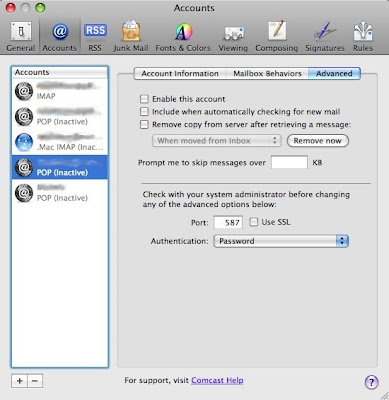
Can't send eMail with comcast account?


Change the outgoing server port to 587, but don't check SSL...

Run mail.
Select the 'Mail' menu (next to the Apple symbol).
Select 'Preferences'.
Click 'Accounts' in the window which opened.
Select the comcast account.
Click 'Advanced'.
Change the port number from 110 or 995, to 587. Don't check SSL.
Close the window, Click 'Save' when prompted.


Friday, April 18, 2008

Typical 'phishing' scam.


An actual eMail.

Clicking on the link supplied [changed] would have taken you to a FALSE site

where thieves would ask for your account name, and password.


From:  service@paypal.com

Subject:  Together to protect your account !

Date:  18 April, 2008 10:27:44 AM GMT-04:00


We recently noticed one or more attempts to log in to your paypal account
from a foreign IP address.

If you recently accessed your account while traveling, the unusual log in
attempts may have been initiated by you. However, if you did not initiate
the log ins, please visit paypal as soon as possible to verify your
identity:
This link is walid for 48 hours.
If you do not verify your information we will make your account limited and
will start an investigation.

https://www.paypal.com/us/cgi-bin/webscr? cmd=verify=PJ321%3490320

Verify your identity is a security measure that will ensure that you are
the only person with access to the account.

Thanks for your patience as we work together to protect your account.

Sincerely,
Paypal Security Team
 
Paypal Email ID PJ321


[link changed to the Anti-Phishing Work Group site.]

Wednesday, April 9, 2008

Avoiding SPAM

Unsolicited eMail accounts for most internet traffic.

Apparently enough money is made through uneducated consumers to continue the practice.
Some things to consider doing to minimize spam:

  *NEVER* reply to an unsolicited eMail.

  *NEVER* "click here to unsubscribe" or "click to be removed", etc...

  *NEVER* click anywhere on a unsolicited eMail, label it as 'Junk' and/or delete it.

  *NEVER* click anywhere on an eMail [such as a one] from a financial institution, go to your browser, and enter the main [known] address manually, use a bookmark, Google to the site, ask some ones advice, or call the business directly if unsure.  -Scams APPEAR like real sites, designed to steal any information entered.

  When filling out online forms, if possible choose *not* to have "partners" (or the like) contact you.


  Create a second eMail account.
gMail from Google, and yahoo from my.yahoo allow you to setup free eMail addresses.
Use one eMail address for trusted individuals, and the other one for questionable circumstances.  Delete everything in the junk account often.


More advanced:

Change Mail's 'Reply-To' address:
While reeking havok with friends and family, altering the 'Reply-To' field will usually insure a person will respond, if necessary. 
Create a new eMail, click the 'View' menu, select 'Reply-To Address Field' and alter your address. i.e. frigtardATgmailDOTcom, or frigtard@gmail.no-spam.com

Configure a spam filter, such as JunkMatcher.