The iPhone-Dev Team and Chronic are working on the actual FREE software.
Redsn0w (iPhone-Dev Team)
Absinthe (Chronic Devolpment)
Before ever considering a purchase, check their support section, HOW could you contact them???
Do NOT fall for the many SCAMS out there.
That is all.
[ Aggregate: iPhone untethered jailbreak 6.1 6.0.2 6.0.1 5.1.1 5.0.1 unlock baseband ]
Thursday, January 24, 2013
iPhone Jailbreak / Unlock DO NOT BUY:
Wednesday, January 23, 2013
iPod, iPhone, iPad Firmware Download:
The various firmware download versions can be found here:
http://theiphonewiki.com/wiki/Firmware
Wednesday, November 9, 2011
Is your iPhone 4S draining the battery quickly?
I heard about the issue before purchasing the new iPhone, which I received 8 Nov.
My iPhone is fine; unless I have reminders set. The battery will then drop faster, too fast.
I opened Settings, clicked Location Services, and turned off Reminders; things returned to normal.
Is this the issue? Too early to tell. Just a theory.
[Apple has apparently discovered the culprit, and is preparing has a fix….]
Monday, September 5, 2011
Avatron Air Display driver issue under Mac OSX: Lion.
- 13" MacBook (aluminum late 2008, early, mid, and late 2009)
- 13" MacBook Air (late 2008, mid 2009)
- 13" MacBook Pro (mid 2009)
- 15" MacBook Pro (late 2008, 2.53 GHz mid 2009, mid 2009)
- 17" MacBook Pro (early and mid 2009).
- 20" iMac (early or mid 2009)
- 24" iMac (early 2009)
- 21.5" iMac (late 2009)
- Mac mini (early or late 2009, Server late 2009)
- Mac mini Mac OS X Server (late 2009)
Thursday, January 21, 2010
Syncing: iPhone <> iCal <> Google Calendar <> windows outlook 2007
Syncing Apple's iPhone calendar to Apple's iCal (internet calendar program) works as advertised.
However, attempting to sync with Google's calendar, and outlook 2007 proved inconsistent at best.
I had been using iCal without issue, but have been asked on several occasions for help with Gmail / outlook.
After a couple days of troubleshooting, I found the easiest answer was to be centered on Google's calendar, with everything else syncing with the gmail (Google eMail) account / password.
[Gmail is a free email / calendar service and provides over 7GB of storage.]
Google Calendar Sync is a freeware windows program (background process) which will sync Google's calendar to microsoft outlook at a specified interval. (outlook for Mac hasn't been released yet.)
Setting up Google calendar (and syncing to iCal):
1) Export your iCal calendar.
(Run iCal, click 'View' click 'Show Calendar List' if it isn't already, then click to highlight your calendar on the left margin, click 'File', select 'Export...', and note where the file is saved.)
Note: You can combine multiple calendars by exporting them individually, and then importing them after selecting your primary calendar you want from the left iCal margin.
2) Login to Gmail, click Calendar. (upper-left corner of the webpage)
Go through the two second setup for the calendar if you haven't created one.
3) Click 'Settings' under 'My Calendars' in the left margin, and click 'Choose File' from the resulting dialog box.
4) Choose your previously exported iCal calendar from its download location. (Step 1)
Your calendar is now on Google.
5) Once the chosen calendar is imported, run iCal, click 'Preferences' and select 'Accounts'; in the resulting dialog box, click the little plus sign to add your Gmail address and password.
Your calendar is now syncing to iCal.
6) Once the calendar appears (under your email address in iCal's left margin), you can compare it to your original by checking the boxes next to each account in the left margin.
Note: You can delete the original you had exported earlier, as the new Gmail one is a duplicate (master), otherwise, leave it unchecked to avoid seeing the duplicate entries.
Syncing Google calendar to Apple's iPhone:
Click 'Settings'
select 'Mail, Contacts, Calendars'.
Add your Gmail account if you haven't already.
Select the Gmail account, click the 'Calendars' switch to 'On'
Note: Google offers "push" for calendars, selecting 'Push' from the 'Fetch New Data' option (under the Accounts listing for the 'Mail, Contacts, Calendars' setting), will provide faster syncing, at the cost of slight battery expense.
Your calendar entries will appear on your iPhone, iCal, Google calendar, and outlook after the specified allotted time set to sync by the individual programs.
...what a mess, time for a drink.
Saturday, September 26, 2009
MMS active on at&t for the iPhone: HowTo for hacked iPhones!
...
(Apple's instructions for enabling MMS on the *non-hacked* iPhone 3G and 3GS here.)
Benm's nstructions for enabling MMS on the *HACKED:)* iPhone 3G and 3GS here.
>>> NOTES BEFORE YOU JUMP OVER TO THE ABOVE LINK:
-Enter the network settings under the MMS area; NOT the Cellular Data area (which is displayed first -scroll down.)
-Please REBOOT your iPhone after following the excellent instructions from the guys over at Benm.


(The original [Edge] iPhone does not support MMS.)
Google intros push eMail for the iPhone!
...
Google's at it again, improving its free eMail with better support for the iPhone!
More Google Goodness.
Thursday, April 9, 2009
iPhone / iTouch Firmware 2.2.1 No or Intermittent WiFi issues:
Some iPhones / iTouchs have experienced No or Intermittent WiFi (wireless ethernet) connectivity.
Thursday, February 12, 2009
Monday, February 9, 2009
Google Wireless iPhone Syncing!
Google has launched a beta** of it's wireless syncing!
*Backup your device first, it will erase your information initially.*
Click here for the web site!
** a few limitations exist, it is in beta.
Wednesday, January 28, 2009
Apple App Store programs refusing to run (dumping immediately back to the main screen):
This post pertains to the applications downloaded from the Apple App Store.
Applications downloaded from 'Cydia' or 'Installer', see posting here.
Symptom: An iPhone / iTouch application appears to crash back to the spring/summerboard upon running.
Possible cause: The application was bought under, or synced to, another iTunes or App Store (.Mac) ID.
Possible solution 1: Uninstall, then reinstall the application.
(Programs purchased can be downloaded again free if using the same ID under which it was bought originally.)
Possible solution 2: Re-sync to the original computer profile/iTunes (apps not purchased under the original iTunes/App Store ID will be lost; the app can be re-downloaded [for free] only under the properly purchased ID).
Tuesday, January 13, 2009
iPhone Stack.app / Entended Preferences.app options not showing in Settings
Symptom 1: Installing the 3rd party app 'Stack' places the floating icon in the center of the dock, and there is no way to adjust this.
Symptom 2: Installing the 3rd party app 'Extended Preferences' doesn't appear to work.
[Uninstalling / reinstalling has no effect.]
The applications install their preferences into the native 'Settings' program.
However, the settings for Stack or Extended Preferences are not shown.
Culprit: 'Stack' and 'Extended Preferences' conflict with each other.
Fix: [From reader Dominick, Thanks!], turn off Extended Preferences in winterboard (if installed).
Fix: Uninstalling Extended Preferences or Stack until a patch is issued.
-Reinstalling Extended Preferences with Stack installed will prevent the extend prefs from appearing.
-Reinstalling Stack with Extended Preferences installed will prevent the exstended options (settings) appearing.
-At this point, it's one or the other.
Some screen shots showing Stack after uninstalling Extended Preferences
Note: you must place an icon behind the stack to space your five icon dock correctly.
A blank icon (using iBlank works best.)
Sunday, December 7, 2008
iPhone resetting contacts / ringtones...
Thursday, October 23, 2008
iPhone App Store; 'Unable to Download Application' Error:
[Occurs when trying to update an existing application]
If you receive this error, try deleting the original...
(Pay attention to page/placement, as you may need to move it to its original location manually.)
First, clear the dialog box, click 'Done', then press and hold your finger on the icon until it starts to "jiggle", press the little 'X' in the upper left corner of the app to delete it.*
Tap the icon again to install it.
Press and hold your finger until it starts to "jiggle", then hold down the center of the icon and drag it to the right edge to move it to another page.
*Apps from Apple's App Store only.
(Cydia and Installer apps, delete through those programs -where it was downloaded from.)
Wednesday, May 14, 2008
Resolving iPhone / iTouch / iPod Syncing issues:

Monday, April 28, 2008
iPhone / iTouch power saving tips:
Friday, April 25, 2008
Changing the default iPhone / iTouch password.
Wednesday, April 23, 2008
Preventing and/or correcting iPhone / iTouch crashes:
Friday, April 11, 2008
iPhone / iTouch: Fixing DIR permissions.
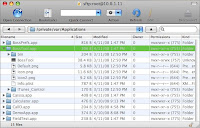
Goto 'Settings', select 'Wi-Fi', and press the little arrow to the right of your wireless network name.
Note the your IP address.

If using Cyberduck, Click 'Open Connection', enter your IP address into the server field.
Enter root into the Username field.
Enter alpine into the password field (unless you changed it).
click 'Connect' -[allow up to 30 secs for secure key generation if SSH wasn't used before.]

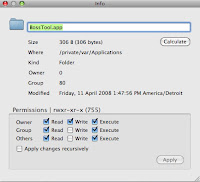
Check the 'Permissions' column, of the app (folder) in question. It should end with (755) or (775).
Click the little triangle to open the directory, the files inside should have similar permissions, except for the '.plist' file, which may end with (644).

Don't forget to turn OFF SSH (install 'BossPrefs' if necessary)
[ installer repository: sleepers.net/iphonerepo ]
Thursday, April 10, 2008
Troubleshooting: iPhone no volume
We were approached with a sick [hacked] iPhone, it had no volume, no vibration - unless receiving a phone call. (Everything else worked fine.)