Heads up:
http://ijailbreakpro.com/
Is a SCAM.
The actual FREE sites are:
iphone-dev.org
or
http://www.iclarified.com/


Heads up:
http://ijailbreakpro.com/
Is a SCAM.
The actual FREE sites are:
iphone-dev.org
or
http://www.iclarified.com/
The iPhone-Dev Team and Chronic are working on the actual FREE software.
Redsn0w (iPhone-Dev Team)
Absinthe (Chronic Devolpment)
Before ever considering a purchase, check their support section, HOW could you contact them???
Do NOT fall for the many SCAMS out there.
That is all.
[ Aggregate: iPhone untethered jailbreak 6.1 6.0.2 6.0.1 5.1.1 5.0.1 unlock baseband ]
The various firmware download versions can be found here:
http://theiphonewiki.com/wiki/Firmware
Some iPhones / iTouchs have experienced No or Intermittent WiFi (wireless ethernet) connectivity.
Google has launched a beta** of it's wireless syncing!
*Backup your device first, it will erase your information initially.*
Click here for the web site!
** a few limitations exist, it is in beta.
This post pertains to the applications downloaded from the Apple App Store.
Applications downloaded from 'Cydia' or 'Installer', see posting here.
Symptom: An iPhone / iTouch application appears to crash back to the spring/summerboard upon running.
Possible cause: The application was bought under, or synced to, another iTunes or App Store (.Mac) ID.
Possible solution 1: Uninstall, then reinstall the application.
(Programs purchased can be downloaded again free if using the same ID under which it was bought originally.)
Possible solution 2: Re-sync to the original computer profile/iTunes (apps not purchased under the original iTunes/App Store ID will be lost; the app can be re-downloaded [for free] only under the properly purchased ID).
Symptom 1: Installing the 3rd party app 'Stack' places the floating icon in the center of the dock, and there is no way to adjust this.
Symptom 2: Installing the 3rd party app 'Extended Preferences' doesn't appear to work.
[Uninstalling / reinstalling has no effect.]
The applications install their preferences into the native 'Settings' program.
However, the settings for Stack or Extended Preferences are not shown.
Culprit: 'Stack' and 'Extended Preferences' conflict with each other.
Fix: [From reader Dominick, Thanks!], turn off Extended Preferences in winterboard (if installed).
Fix: Uninstalling Extended Preferences or Stack until a patch is issued.
-Reinstalling Extended Preferences with Stack installed will prevent the extend prefs from appearing.
-Reinstalling Stack with Extended Preferences installed will prevent the exstended options (settings) appearing.
-At this point, it's one or the other.
Some screen shots showing Stack after uninstalling Extended Preferences

Note: you must place an icon behind the stack to space your five icon dock correctly.
A blank icon (using iBlank works best.)
 [Occurs when trying to update an existing application]
If you receive this error, try deleting the original...
(Pay attention to page/placement, as you may need to move it to its original location manually.)
First, clear the dialog box, click 'Done', then press and hold your finger on the icon until it starts to "jiggle", press the little 'X' in the upper left corner of the app to delete it.*
Tap the icon again to install it.
Press and hold your finger until it starts to "jiggle", then hold down the center of the icon and drag it to the right edge to move it to another page.
*Apps from Apple's App Store only.
(Cydia and Installer apps, delete through those programs -where it was downloaded from.)

Unhacked devices; touch 'Settings', touch 'General', touch 'About'.
Hacked devices; Installer.app currently doesn't provide a 'disk' space check [but Cydia does].
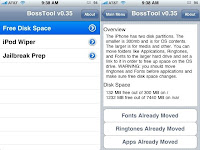
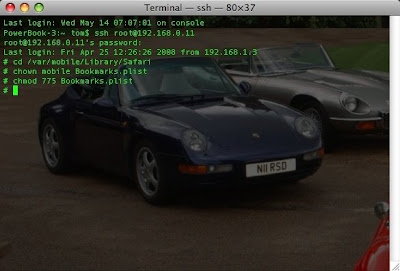
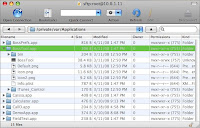
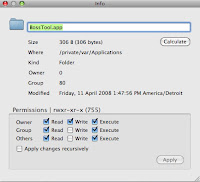
[Update: Changing the user ID (App Store / Mobile Me) will also cause this issue, use ONE login on your device. -Perhaps a shared one; keep the password secret for billing purposes...more here]To help avoid future crashes, monitor iPhone/iTouch free space using BossTool, as described here.Fixing iPhone Installer crash: Assuming resetting the springboard and rebooting the iPhone didn't work, *** The following is for firmware 1.x.x only, NOT 2.x.x ***
you'll need a Secure SHell to the iPhone.
(SSH should be among the first few programs installed, with BSD subsystem (necessary for most programs) , and BossPrefs (necessary to turn SSH on and OFF when not needed.))


