Friday, July 22, 2011

Wednesday, July 13, 2011

Comcast / Xfinity: Programming the remote to a TV/VCR/DVD combo device

Some TV's use two different codes for "On" and "Off": Try pressing 'Ch +' [Channel Up] followed by the 'Power' button to either power the TV on or off.


If the  remote codes (link) fail to work the television, try programing the 'Aux' button using the TV's brand for VCR's and DVD players.


If the 'Aux' button powers the TV but will not work the volume, try programming the 'TV' button again, this time trying only the volume keys.


If all else fails, try assigning the volume keys to the 'Aux' button:
Press and release the 'Aux' button ['AUX' button blinks].

Press and hold the 'Setup' button ['Aux' button will blink twice] release the 'Aux' button, and press '9', '9', '3' followed by 'Aux' again. ['Aux' button blinks twice].

Try the volume keys now.

Programming a Comcast / Xfinity DTA to the standard remote control

The DTA remote code is 01982:

Programming a Comcast / Xfinity Digital Terminal Adaptor to a Comcast / Xfinity standard remote is a two step process.

1.) Unlock the remote by pressing and releasing the 'Cable' button ['Cable' button blinks] and then holding 'Setup' ['Cable' button blinks twice] release 'setup', and press '9' then '8' then '2' ['Cable' button blinks four times].

2.) Enter the Cisco / Motorola / Pace DTA code by pressing '0', '1', '9', '8', '2' ['Cable' button blinks twice].

The remote should now control the adaptor.

Tuesday, November 23, 2010

Use Your iPad As A Second [Wireless] Monitor:

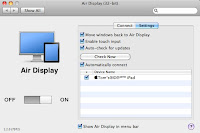
Available from the Apple App Store ‘Air Display' [$9.99US] will allow you to use your iPad through your wireless network as a second monitor with your Macintosh, or regular PC.

It works pretty well, although a tad sluggish [tried on a ‘G-band’ WiFi network].

Pricey, but a pretty good application overall.


Align like any other monitor.
The iPad resolution is 768 X 1024 [or 1024 X 768 :^].


Some Screen savers display on both monitors, albeit with some delay; especially the more animated ones [like this one via MacUpdate].


Main screen, and iPad to the right.
There’s a little optional drop-down menu with preferences for the menu bar at the top.


Apparently it works with the iPhone, and iTouch too, and adds touch-screen to the device monitor. Cool.

Secure those iPad (iPhone, iTouch) Files:

With most new/cool/electronic devices, people like to gain hands-on experience ...for good or bad.
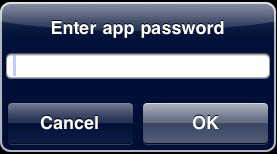
Locking the iPad (or iPhone, iTouch) with a passcode is a good first step, but what if someone wants to try the device out?

Using an app like “Goodreader” allows you to password protect your sensitive documents (Text, Photo, PDF, etc…) from prying eyes.


Sunday, November 7, 2010


Having flash installed on your devices apparently does shorten battery life.

Steve Jobs' [CEO; Apple Inc.] company has been criticized for refusing to allow Adobe’s Flash software it be installed on it’s portable iOS devices (iPhone, iTouch, iPad), and the new OSX Macbook Air laptop computer [user installable].

The stated primary reasons were security and power consumption issues.

While the security issues are being addressed, the power problem is just beginning to come to light (of the end-users).

Steve Jobs may be a [highly?] regarded as an over-zealous pitchman, but he’s certainly no liar.


iMage found via Google from polygeek.com.

Monday, October 18, 2010

Monday, July 12, 2010

windows 7 forgetting your network drive login?

Is windows 7 not remembering your network password?!?


...really!?! -sarcasm.


Click 'the windows Marble' [Aqua-blue bubble encompassing the windows symbol ...replacing the 'Start' menu] -Lower left hand corner, usually.

Click 'Control Panel'

Click [If viewed by categories] 'User Account and Family Safety' ["Safety?!?" ...This IS windows....] then click 'Credential Manager'

Or [If viewed by icons; just] 'Credential Manager'

Click 'Add a windows Credential'

Enter the IP address of the server [example: 10.0.1.1], or the server name [example: \\Bootcamp\winblows 7*]

or theserver.whatever.com*, with the Username*, and password* as prompted.

Click 'OK'

This should force windows to remember your network login.


"May the farce [sic] be with you."


* Examples WILL vary;
Enter the username and password of a valid account for the router itself in a browser. [http://192.168.1.1 or http://192.1698.0.1 as an IP Address, with 'admin' as a username and 'password' as the password, when prompted. -Consult the CD, manual, or online dox of the router brand for clarity.]


...Still having issues, apparently placing files in the root directory will work, just relocate it into the subfolder after transfer.


Thursday, May 20, 2010

New poll: Will you switch from at&t (or purchase) the iPhone when the option exists?!?

[The poll is at the right-hand side of the page…]

Thank You.

: )